Chapter 4: 結果の確認
結果サマリ、ガイドライン対応状況、攻撃シナリオ、対応候補
結果画面の概要
すべての質問に回答すると、結果画面が利用可能になります。結果画面は複数のセクションで構成されており、組織のセキュリティ対策状況をさまざまな角度から確認できます。
対応候補の表示
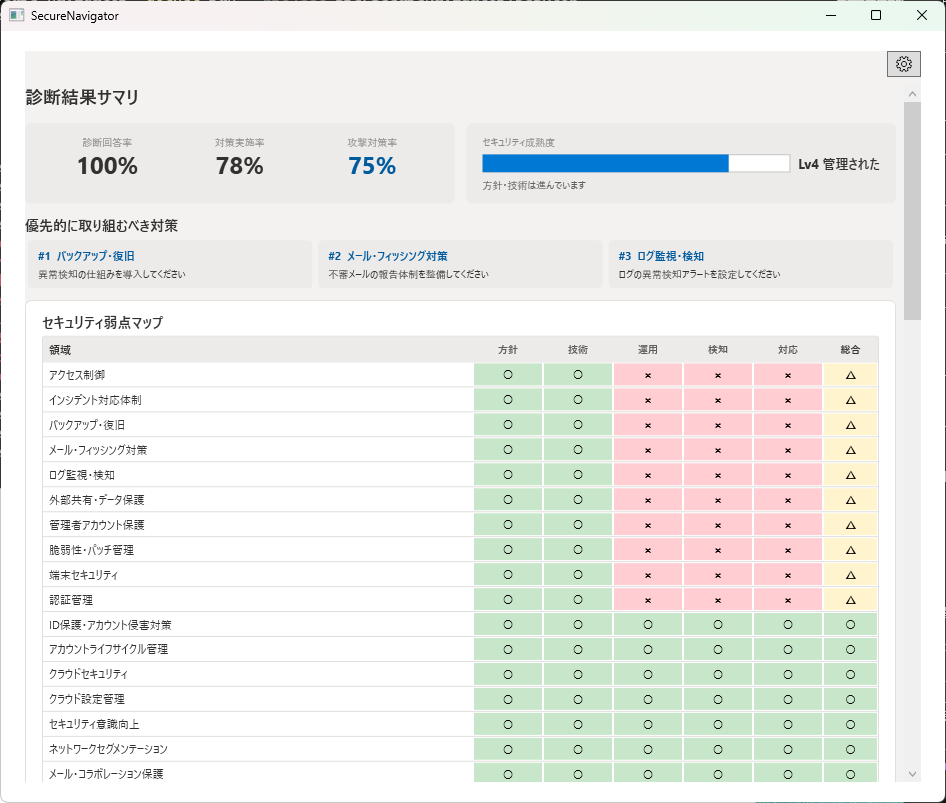
結果画面の上部には、検討しやすい対応候補が表示されます。これは診断結果からルールベースで算出された参考情報であり、利用者の環境や運用状況に合わせて判断してください。
弱点マップ(テーマ x レイヤーマトリクス)
弱点マップは、セキュリティ対策のテーマ(例: アクセス制御、ネットワーク防御、インシデント対応)と防御レイヤー(例: 予防、検知、対応)を掛け合わせたマトリクス形式で表示されます。
各セルは対策の充実度に応じて色分けされ、組織全体のセキュリティ対策のバランスと弱点を視覚的に把握できます。色が薄い(対策が手薄な)領域が、攻撃者にとって狙いやすいポイントです。
攻撃シナリオテーブル
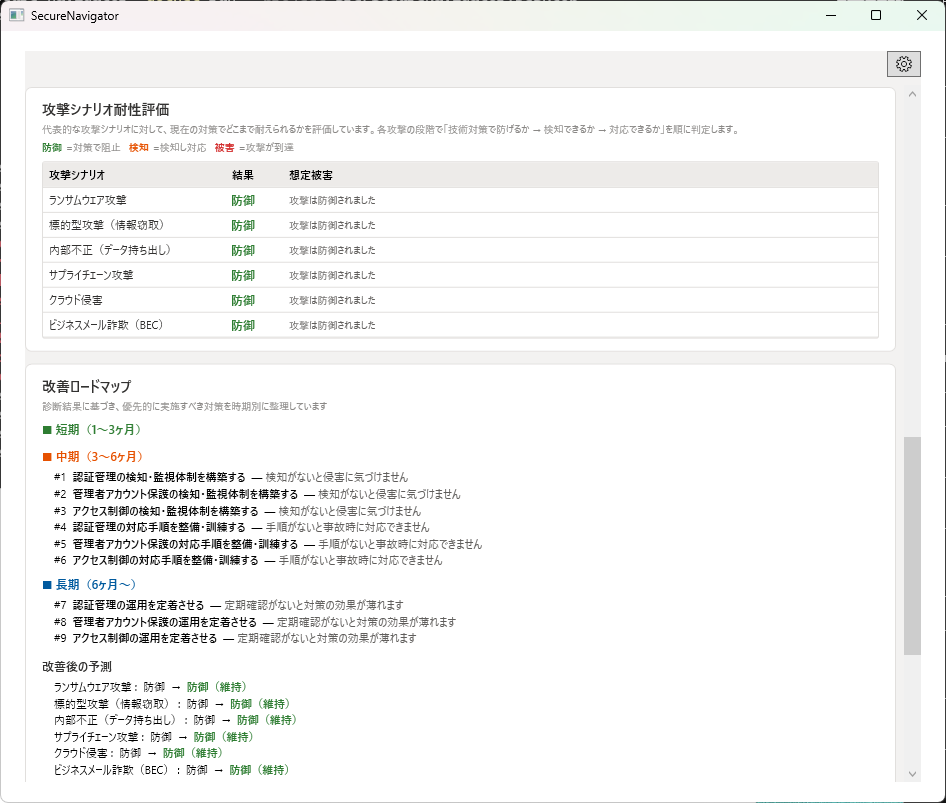
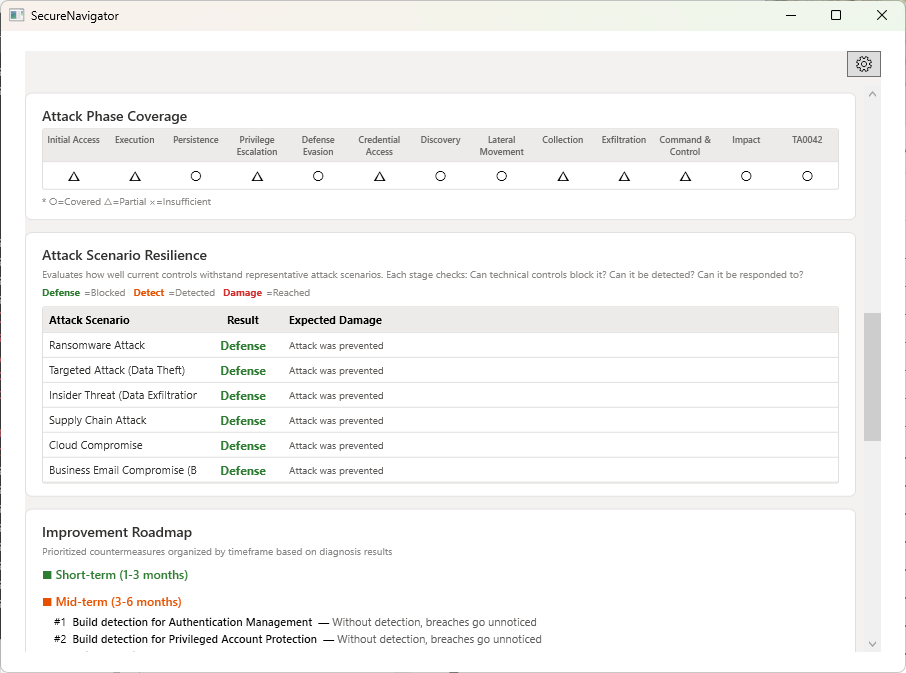
SecureNavigator は6つの代表的な攻撃シナリオについて、各ステップでの防御成功率をシミュレーションします。テーブルには各シナリオの名称、攻撃ステップ数、防御の総合評価が表示されます。
各シナリオの行をクリックすると、攻撃ビュー画面に遷移し、ステップごとの詳細を確認できます。
対応候補
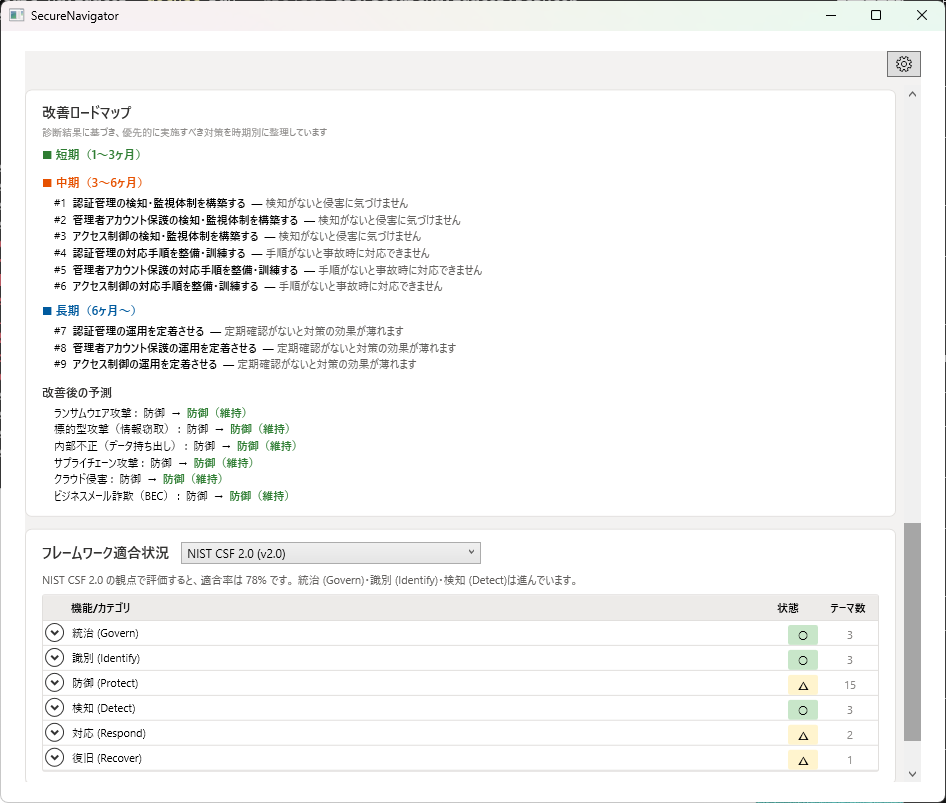
診断結果に基づき、改善施策の候補を4つの時間軸で整理して表示します。
| 時間軸 | 内容 |
|---|---|
| 今すぐ | 既存リソースで即時対応可能な施策。コストをかけずに実行できる設定変更や運用ルールの整備など。 |
| 短期(1-3ヶ月) | 比較的短期間で導入可能な施策。ツールの設定変更、ポリシーの策定・適用など。 |
| 中期(3-6ヶ月) | 計画的な導入が必要な施策。新規ツールの検討・導入、体制の構築など。 |
| 長期(6ヶ月以上) | 組織的な取り組みが必要な施策。セキュリティ文化の醸成、大規模な基盤整備など。 |
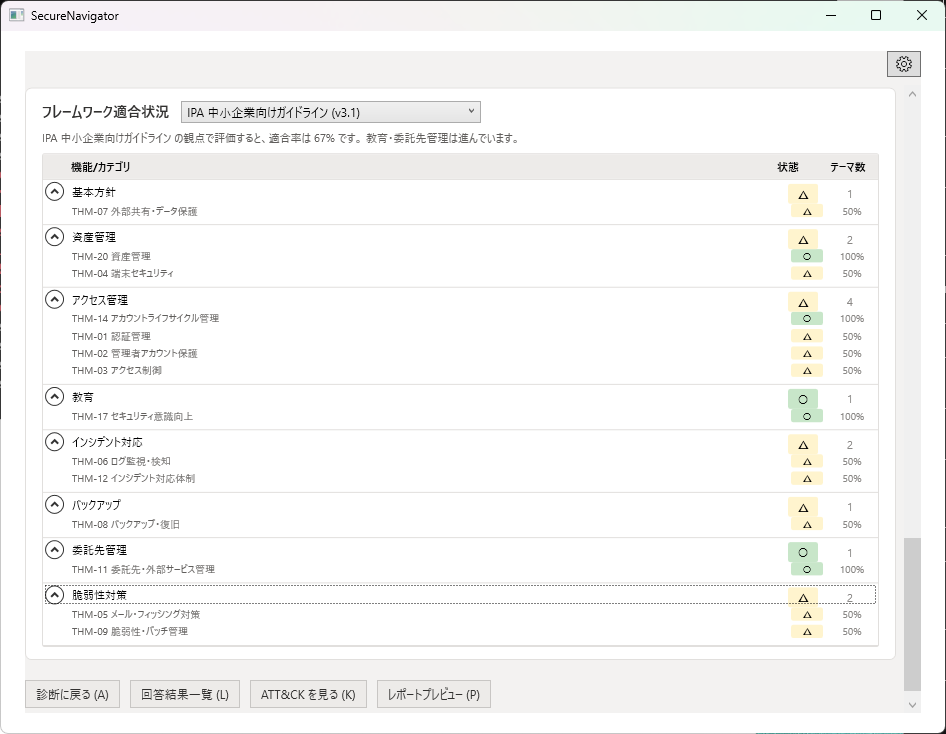
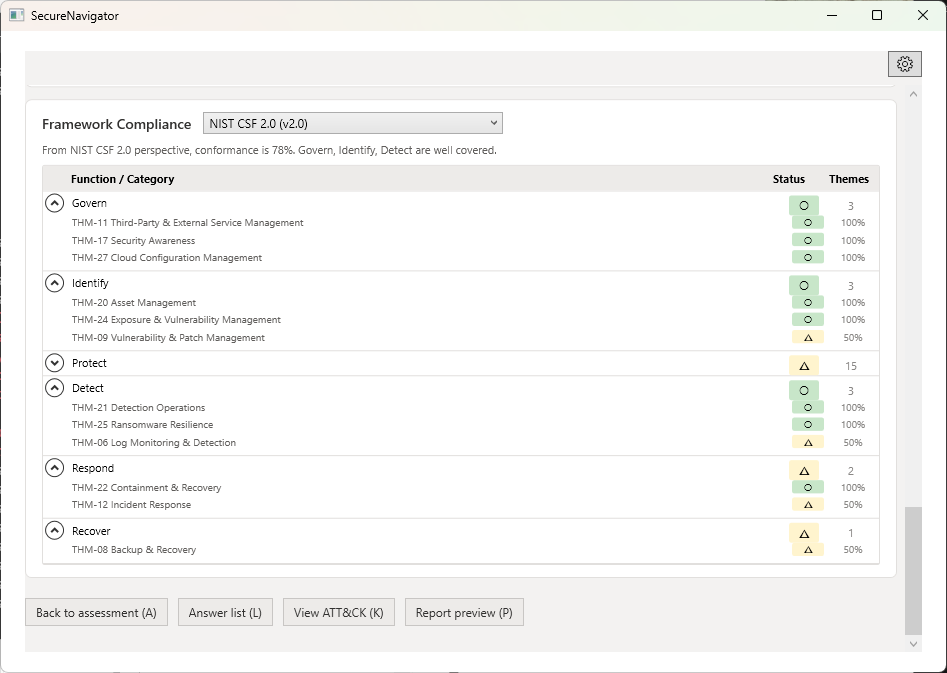
フレームワーク参考確認
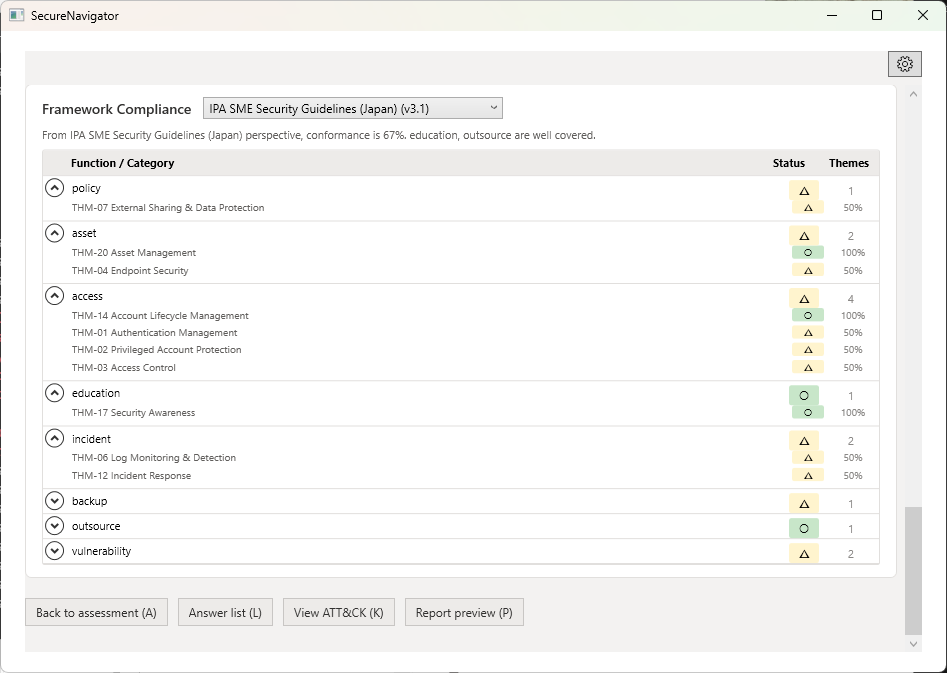
診断結果を各セキュリティフレームワーク・ガイドラインの要素に照らし合わせて、対応状況を参考情報として表示します。
| フレームワーク | 対応エディション |
|---|---|
| IPA 中小企業の情報セキュリティ対策ガイドライン | Free / Pro |
| 経済産業省 サイバーセキュリティ経営ガイドライン | Pro のみ |
| NIST Cybersecurity Framework 2.0 | Pro のみ |
フレームワーク参考確認は自己点検のための参考情報です。公的な認証、適合証明、公式な準拠判定を意味するものではありません。
Chapter 4: Viewing Results
Result summary, guideline mapping, attack scenarios, action planning
Results Screen Overview
Once all questions are answered, the Results screen becomes available. It consists of multiple sections that present your organization's security posture from different perspectives.
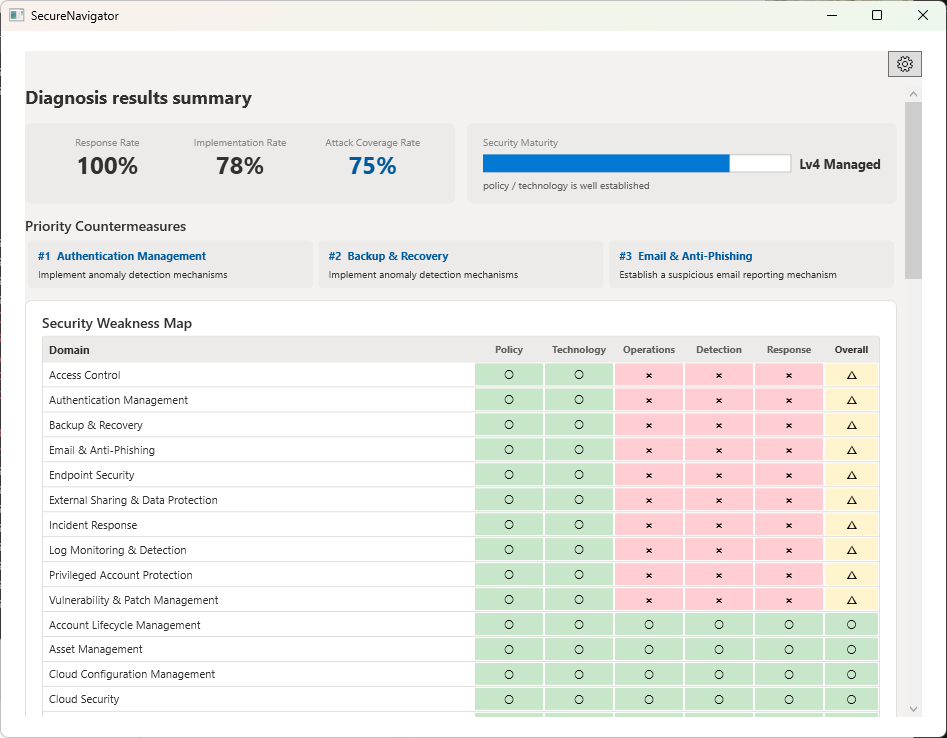
Suggested Actions
The top section of the Results screen highlights improvement candidates that may be useful to review first. They are rule-based reference information and should be evaluated against the user's environment and operating context.
Weakness Map (Theme x Layer Matrix)
The weakness map is displayed as a matrix combining security themes (e.g., Access Control, Network Defense, Incident Response) and defense layers (e.g., Prevention, Detection, Response).
Each cell is color-coded based on the level of control implementation. This allows you to visually grasp the balance and gaps in your organization's security controls. Lightly colored areas (thin coverage) represent the points most vulnerable to attackers.
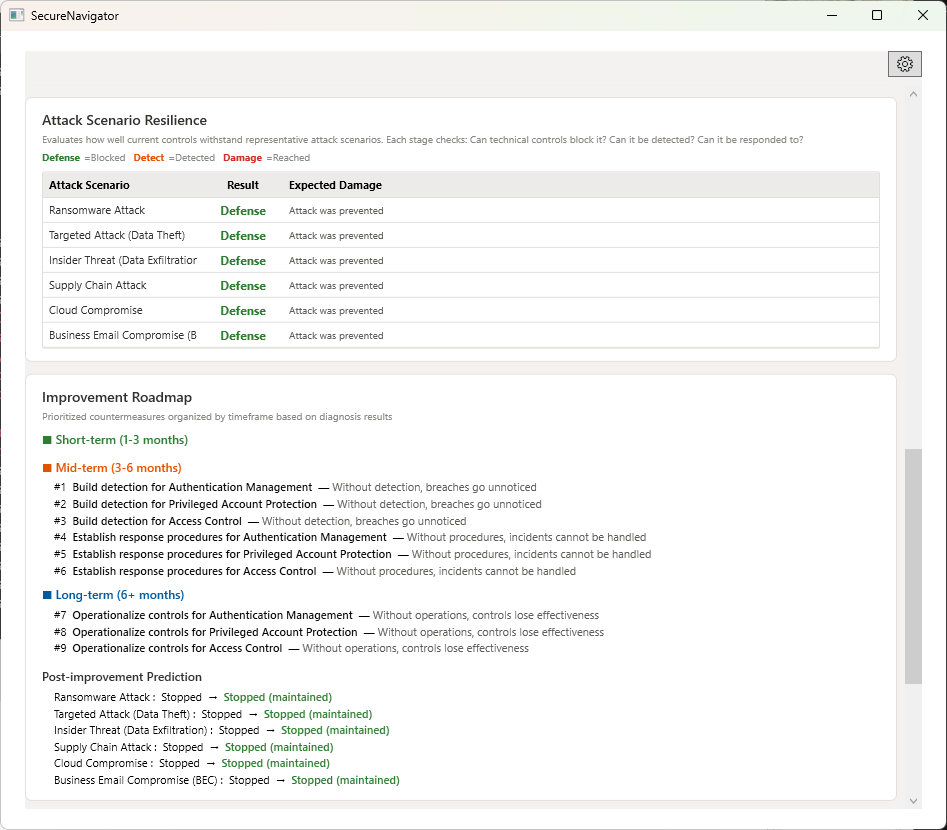
Attack Scenarios Table
SecureNavigator simulates 6 representative attack scenarios, evaluating the defense success rate at each step. The table shows each scenario's name, number of attack steps, and overall defense rating.
Click on any scenario row to navigate to the Attack View screen and examine step-by-step details.
Action Planning
Based on the assessment results, suggested improvement actions are organized across four time horizons.
| Time Horizon | Description |
|---|---|
| Immediate | Actions that can be taken right away with existing resources. Configuration changes and operational rule updates that require no additional cost. |
| Short-term (1-3 months) | Measures that can be implemented in a relatively short period. Tool configuration changes, policy drafting and enforcement. |
| Mid-term (3-6 months) | Measures requiring planned implementation. Evaluation and deployment of new tools, team structure building. |
| Long-term (6+ months) | Measures requiring organizational commitment. Building a security culture, large-scale infrastructure improvements. |
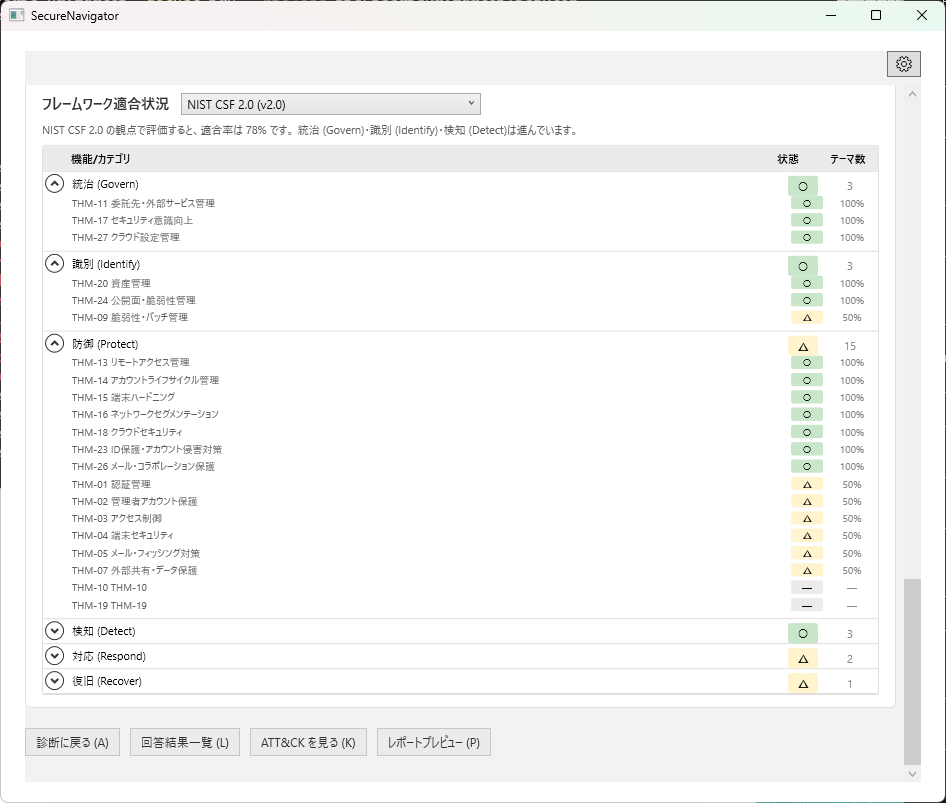
Framework Reference Checks
Assessment results are mapped against elements of each security framework and guideline, displaying reference status views.
| Framework | Available In |
|---|---|
| IPA SME Information Security Guidelines | Free / Pro |
| METI Cybersecurity Management Guidelines | Pro only |
| NIST Cybersecurity Framework 2.0 | Pro only |
Framework reference checks are reference information for self-assessment. They do not constitute official certification, conformity attestation, or official compliance determination.