「対策の有無」だけでなく「どこが攻撃経路になりうるか」を整理する
多くのセキュリティ評価ツールは「対策が存在するか」を確認します。しかし実務で必要なのは「想定される攻撃に対して、どこが弱いのか」の整理です。
SecureNavigator は、MITRE ATT&CK の攻撃手法を基に、対策の弱点 → 攻撃の進行経路 → 想定被害をルールベースで分析。防御上の弱点と着手候補を整理し、報告・改善検討に使えるレポートを生成します。
主な機能
攻撃シナリオシミュレーション
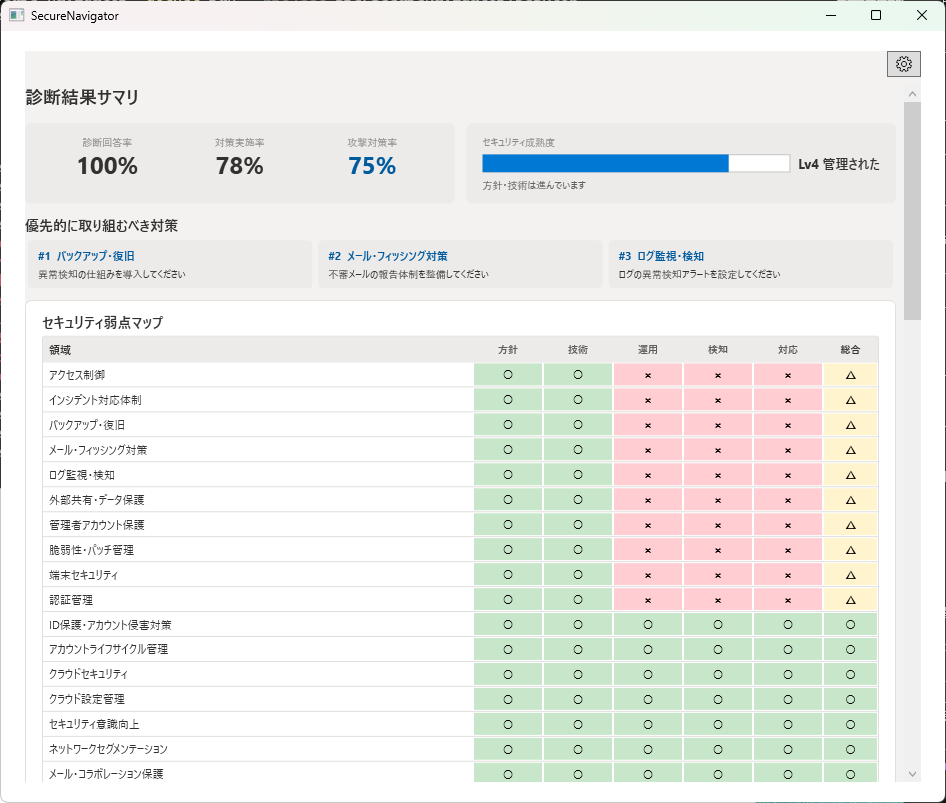
6つの代表的な攻撃シナリオに対して、組織の防御力をステップごとに分析します。
ガイドライン参考確認
IPA 中小企業向けガイドライン、経産省サイバーセキュリティ経営ガイドライン、NIST CSF 2.0 を参考に対応状況を整理します。
対応候補の整理
診断結果から「今すぐ」「短期」「中期」「長期」の4段階で着手候補を表示します。
レポート・資料出力 Pro
診断結果を PDF / HTML レポートとして出力。説明・報告・改善検討の資料として活用できます。
高度な分析セクション Pro
成熟度詳細、原因と対策テーブルなど、より深い分析を確認できます。
日本語 / 英語切替
診断・レポートともに日本語と英語に対応しています。
v1.2 更新内容
- 動作基盤を .NET 10 に更新しました。
- MITRE ATT&CK、NIST CSF 2.0、AI 関連ガイドラインなどの参照情報と表示を更新しました。
- 既存の診断結果は引き続き利用できます。
Free / Pro 比較
| 機能 | Free | Pro |
|---|---|---|
| 診断(全問回答) | ✓ | ✓ |
| 攻撃シナリオシミュレーション | ✓ | ✓ |
| 対応候補の整理(画面表示) | ✓ | ✓ |
| IPA 中小企業向けガイドライン参考確認 | ✓ | ✓ |
| 経産省サイバーセキュリティ経営ガイドライン参考確認 | — | ✓ |
| NIST CSF 2.0 参考確認 | — | ✓ |
| AI 関連参考確認(NIST AI RMF / 総務省 AI セキュリティガイドライン / UK NCSC Secure AI System Development 関連ガイダンス を参考にした確認結果の表示。準拠・認証・適合判定を示すものではありません) | — | ✓ |
| 高度な分析(成熟度詳細・原因と対策) | — | ✓ |
| ATT&CK テクニック詳細分析 | — | ✓ |
| PDF レポート出力 | — | ✓ |
| HTML / Markdown レポート出力 | — | ✓ |
| ヒアリングシート出力(Excel) | — | ✓ |
| 日本語 / 英語切替 | ✓ | ✓ |
| セッション保存数 | 1件 | 3件 |
※ 診断結果のルールベース分析は参考情報であり、セキュリティ状態の完全性や特定目的への適合性を保証するものではありません。
🔒 完全オフライン動作 — SecureNavigator は外部にデータを送信しません。診断データは利用者のローカル環境にのみ保存されます。
画面イメージ
動作要件
- Windows 10 Version 2004 以降 / Windows 11
- WebView2 Runtime(PDF 出力に必要。通常は OS に同梱済み)
- ディスク容量: 約 50 MB
- インターネット接続: 不要(完全オフライン動作)
Not "Do you have controls?" but "Where are the gaps?"
Most security assessment tools verify whether controls exist. But what practitioners need is: "Against likely attacks, where are we weak?"
SecureNavigator uses MITRE ATT&CK techniques to analyze control gaps → potential attack paths → estimated impact through rule-based assessment. It organizes defensive weaknesses and suggested actions into reports you can use for communication and planning.
Key Features
Attack Scenario Simulation
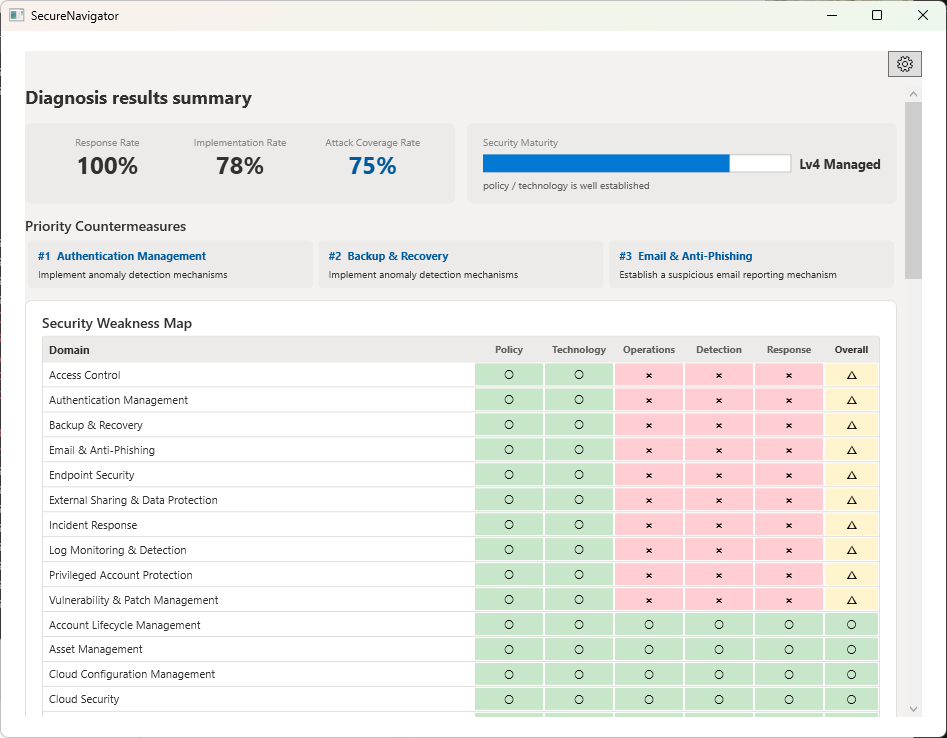
Analyze your defenses against 6 representative attack scenarios, step by step.
Framework Compliance
Organize status using IPA SME Guidelines (Japan), METI Cybersecurity Guidelines (Japan), and NIST CSF 2.0 as reference material.
Action Planning View
View suggested actions across 4 time horizons: Immediate, Short-term, Mid-term, and Long-term.
Report & Document Export Pro
Export assessment results as PDF / HTML reports for management communication and improvement planning.
Advanced Analysis Pro
Review detailed maturity breakdown, cause-and-action tables, and deeper analysis.
Japanese / English
Both assessment and reports support Japanese and English.
v1.2 Updates
- Updated the runtime to .NET 10.
- Updated reference information and displays for MITRE ATT&CK, NIST CSF 2.0, and AI-related guidance.
- Existing assessments remain available.
Free vs. Pro
| Feature | Free | Pro |
|---|---|---|
| Full Assessment (all questions) | ✓ | ✓ |
| Attack Scenario Simulation | ✓ | ✓ |
| Action Planning View (on-screen) | ✓ | ✓ |
| IPA SME Guidelines reference checks (Japan) | ✓ | ✓ |
| METI Cybersecurity Guidelines reference checks (Japan) | — | ✓ |
| NIST CSF 2.0 reference checks | — | ✓ |
| AI-related Reference Checks (results referencing NIST AI RMF / Japan MIC AI Security Guidelines / UK NCSC Secure AI System Development guidance. Not an indication of compliance, conformity, or certification) | — | ✓ |
| Advanced Analysis (maturity detail, cause & action) | — | ✓ |
| ATT&CK Technique Detail Analysis | — | ✓ |
| PDF Report Export | — | ✓ |
| HTML / Markdown Report Export | — | ✓ |
| Hearing Sheet Export (Excel) | — | ✓ |
| Japanese / English | ✓ | ✓ |
| Saved Sessions | 1 | 3 |
* Assessment results are rule-based reference information and do not guarantee completeness or fitness for any particular purpose.
🔒 Fully Offline — SecureNavigator never transmits your data. All assessment data is stored only on your local device.
Screenshots
System Requirements
- Windows 10 Version 2004 or later / Windows 11
- WebView2 Runtime (required for PDF export; usually bundled with the OS)
- Disk space: approx. 50 MB
- Internet: Not required (fully offline operation)